CALL 800-985-6929
Mon-Fri 7AM - 7PM CST


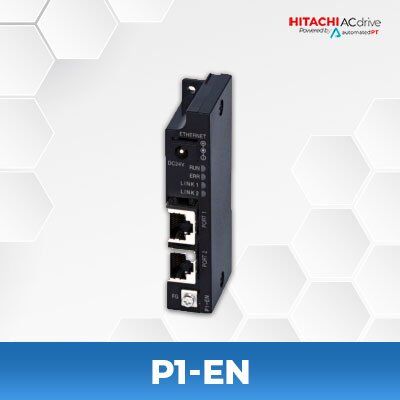
Hitachi P1-EN
$384.25
29 in stock
- Accessory: Ethernet Communication Option Board
- Compatible with: Hitachi SJ-P1 Series Inverters
- Protocol: Modbus TCP (IPv4 / IPv6)
- Interface: Dual RJ-45 Ports (10BASE-T / 100BASE-TX)
SPECIFICATIONS
| Model Name | P1-EN |
| Type | Ethernet Communication Option (Modbus TCP) |
| Compatible Inverters | Hitachi SJ-P1 Series (Ver. 2.00 or higher) |
| Supported Protocols | Modbus TCP (IPv4 / IPv6) |
| Physical Layer | 10BASE-T / 100BASE-TX (IEEE 802.3) |
| Connector Type | RJ-45 × 2 (PORT1 / PORT2) |
| Communication Distance | Up to 100 m (Category 5e STP cable) |
| Auto MDI-X | Available when communication speed is set to Auto Negotiation |
| External Power Supply | 24 VDC ±10% (Optional, 2A or higher) |
| LED Indicators | RUN (Green), ERR (Red), LINK1 (Green), LINK2 (Green) |
| Communication Parameters | IP Address, Subnet Mask, Gateway, Timeout, Port Settings |
| Operation Temperature | −10 °C to +50 °C (Operation) |
| Storage Temperature | −20 °C to +65 °C |
| Humidity | 20 – 90 % RH (non-condensing) |
| Vibration Resistance | 5.9 m/s² (0.6 G) at 10–55 Hz |
| Enclosure Rating | IP00 (Open Frame) |
| Dimensions (W × H × D) | 33 × 96.5 × 20 mm (excluding protrusions) |
| Weight | Approx. 150 g |
| Compliance | IEC/EN 61800-3, IEC/EN 61800-5-1 (SELV) |
Manuals and Specifications
| User’s Guide | Hitachi P1-EN User’s Guide |
SERIES DESCRIPTION
The Hitachi P1-EN is an Ethernet communication option board designed for SJ-P1 series inverters.
It provides high-speed Modbus TCP communication over both IPv4 and IPv6 networks, allowing seamless integration with PLCs, SCADA, and other automation systems.
The module includes dual RJ-45 ports for daisy-chain or hub-based topologies, LED indicators for communication status, and optional 24 VDC power input.
Features
- Modbus TCP communication via IPv4 / IPv6 (10BASE-T / 100BASE-TX)
- Dual RJ-45 ports for flexible Ethernet configuration
- LEDs for RUN, ERR, LINK1, and LINK2 status indication
- Optional 24 VDC external power input
- Compact, direct-mount design compatible with SJ-P1 series (Ver. ≥ 2.00)

Got a Question? We're Here To Help
- For Manuals, Catalogs & Documentation: See Files Section
- Need More Help? Contact Us